Actions overview
An action is something Bicycle does in one of your tools when an investigation confirms a cause — post to a Slack channel, open a Jira ticket, page an on-call engineer, pause a CRM campaign.
Everything up to this point in the model is analysis. Patterns detect, drivers explain, and both produce findings someone still has to read. An action is the point where a finding leaves Bicycle and lands somewhere your team already works.
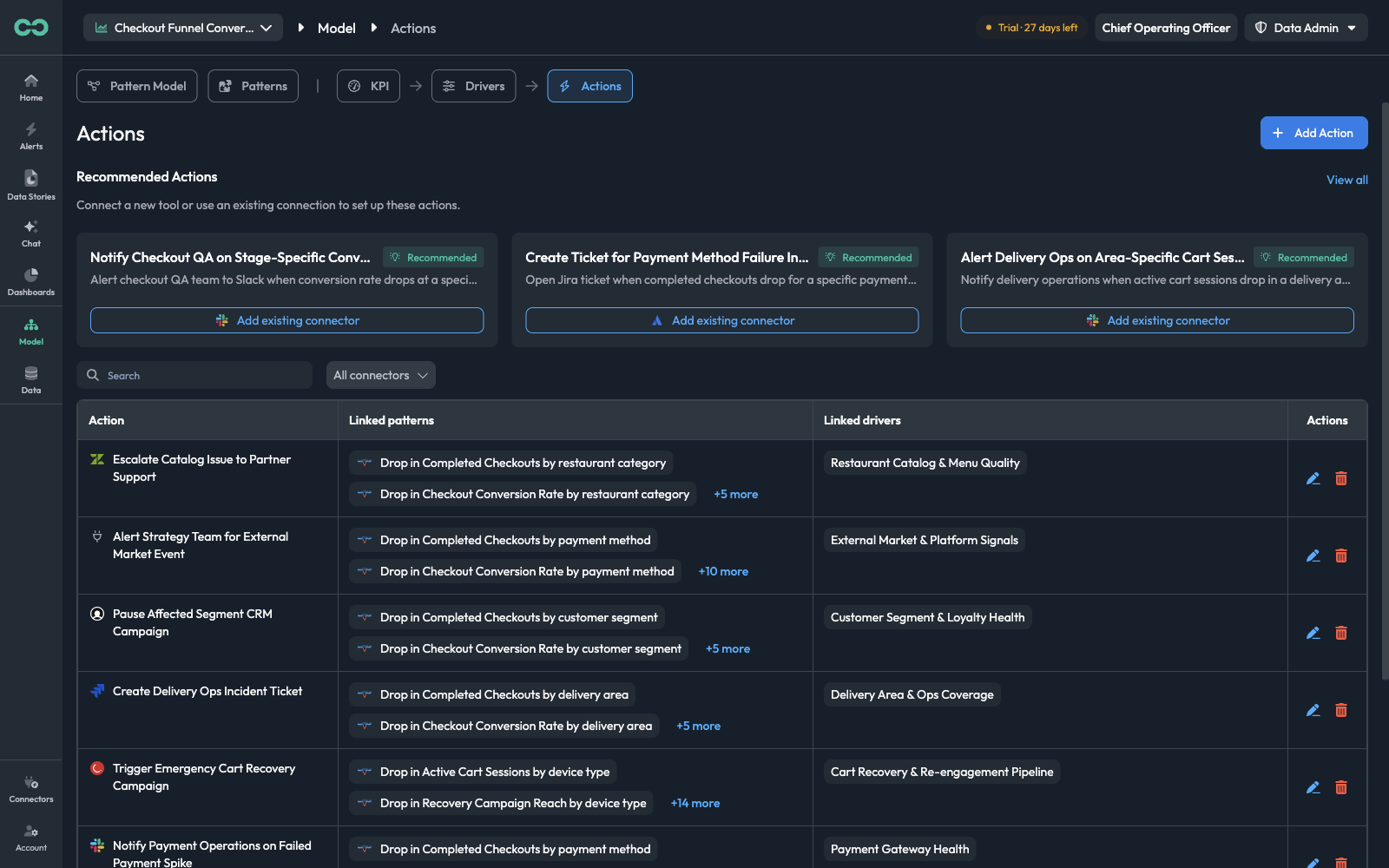
Actions live under Model → Actions, scoped to one use case.
How an action fires
An action is never triggered directly by a pattern. The chain runs through a driver:
A pattern detects an anomaly
Drop in Completed Checkouts by payment method.
A driver linked to that pattern is confirmed
The investigation tests the hypotheses in Payment Gateway Health and the evidence supports one of them.
The actions attached to that driver run
Page On-Call Engineer for Payment Gateway Incident fires, with the affected payment method and the KPI deviation filled in.
This indirection is what keeps alerting proportionate. The action is attached to the cause, so it fires when that cause is actually established — not on every reading that happens to be out of band.
The Linked drivers column is the one to check first when an action is not running. An action that no driver points at is a definition sitting in the catalog with nothing to trigger it.
Core concepts
ConnectorThe connection the action runs through — a Slack workspace, a Jira project, a PagerDuty account. Actions can only use connections that already exist.
ToolThe specific operation on that connector — Slack Send Or Edit Message, Slack Schedule Message, Slack Join Channel. One connector offers many; an action uses exactly one.
Input parameterA field the tool itself defines — a Slack channel ID, a message body, a thread timestamp. Bicycle reads these from the connector and they cannot be renamed or removed.
Input variableA named placeholder, written {{like_this}}, that the agent fills in at run time with context from the anomaly. See Input variables.
Linked driverThe driver whose confirmation fires this action. An action can be linked to several.
Reading the Actions catalog
| Column | What it tells you |
|---|---|
| Action | The connector's icon and the action name |
| Linked patterns | The patterns that can ultimately lead here, via the linked drivers, with +N more to expand |
| Linked drivers | The drivers that fire this action — the direct trigger |
| Actions | Edit the action, or delete it |
Above the table, Search filters by name and All connectors narrows to one tool, which is the quick way to answer "what does Bicycle do in our Slack?" before you add another thing that does.
The Linked patterns count is worth reading as a blast radius. An action showing +19 more will fire from any of twenty patterns — appropriate for a Slack notification, usually not for paging someone.
Recommended actions
Above the catalog, Bicycle proposes actions for this use case, derived from its KPIs and dimensions — Notify Checkout QA on Stage-Specific Conversion Drop, Create Ticket for Payment Method Failure Investigation.
Each suggestion names the tool it needs and offers Add existing connector when you already have a connection that will serve. View all opens the full set.
Naming actions
Action names are read in two places where the context is thin: a driver's Next steps panel, and the alert or ticket that results. A name that carries the verb and the audience survives both.
| Instead of | Write |
|---|---|
Slack alert | Notify Checkout Engineering Slack Channel |
Payment issue | Page On-Call Engineer for Payment Gateway Incident |
CRM | Pause Affected Segment CRM Campaign |
Where to go next
- Create an action — connector, tool, parameters, and variables
- Drivers — attaching actions to the cause that fires them
- Connectors Available — connecting the tool first