Chat overview
Chat answers questions about your data in plain language — "Which device types have the highest Payment Failure Rate?" — using the KPIs and dimensions you have already modelled.
It is the counterpart to a dashboard. A dashboard is for a question you will ask every week and want a permanent home for. Chat is for the question you have right now, including the ones you did not know you would need until a pattern flagged something.
Chat lives under Chat, scoped to one use case.
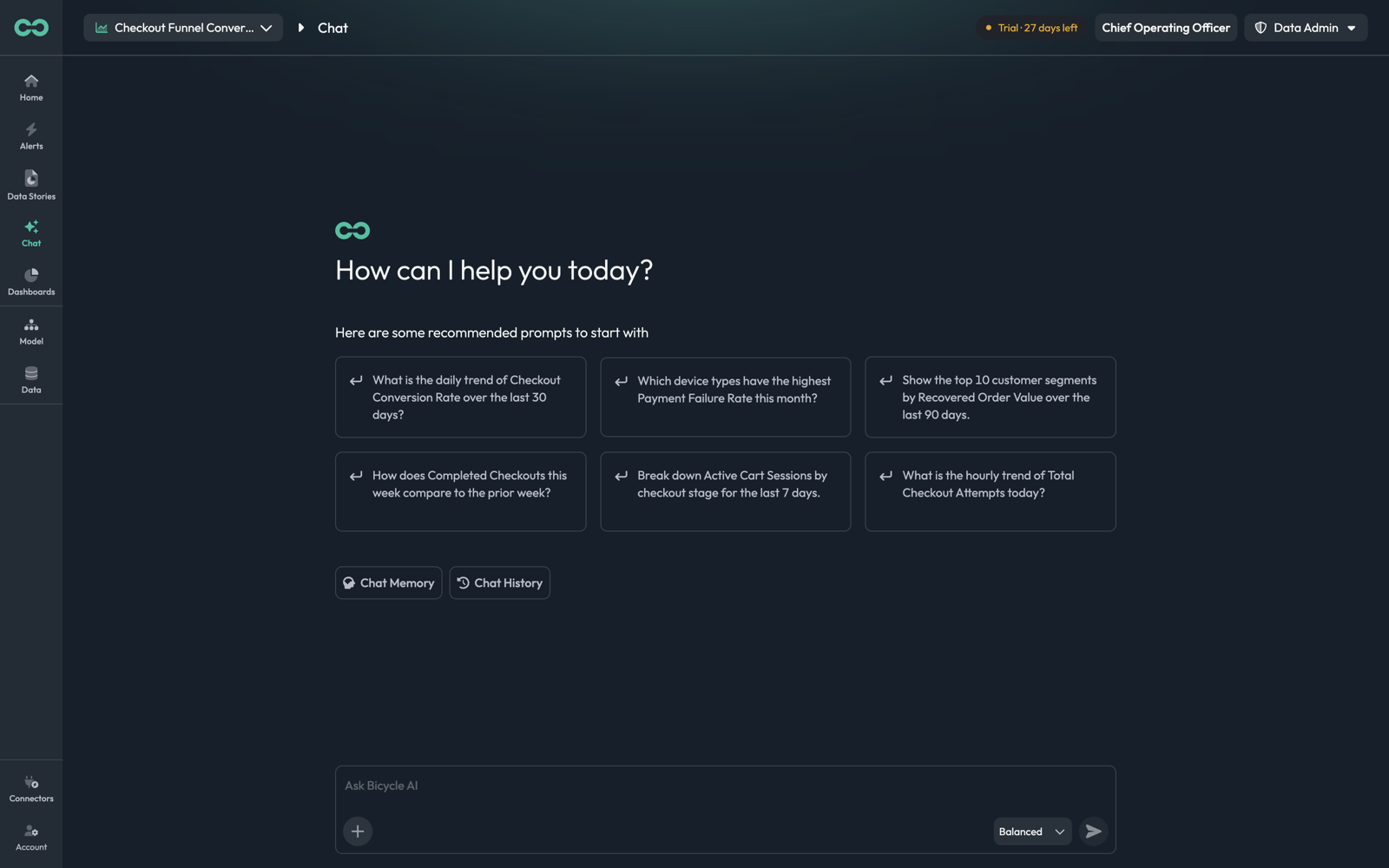
The landing page
Recommended promptsSix questions generated for this use case, built from its actual KPIs and dimensions — "Show the top 10 customer segments by Recovered Order Value over the last 90 days." Clicking one asks it.
Ask Bicycle AIThe composer. + attaches a file, the mode selector sets reasoning effort, and the send button submits.
Chat MemoryStanding facts the agent should apply to every question. See Memory and history.
Chat HistoryPast conversations in this use case. See Memory and history.
Once a conversation starts, Chat Memory and Chat History move into the header as icons, alongside a third that opens the session's working files.
Reasoning modes
The selector beside the send button decides how much reasoning to spend on the question.
| Mode | Description in the app | Reach for it when |
|---|---|---|
| Fast | Quick, direct answers | The question is a single lookup — one KPI, one breakdown, one window |
| Balanced | Smart, well-reasoned | The default, and right for most questions |
| High | Thorough, multi-step reasoning | The question needs several queries whose results feed each other — comparisons across periods, or "why" rather than "what" |
The same three appear wherever Bicycle takes a prompt, including dashboard generation.
You can ask a Fast question, read the answer, and follow up in High mode within the same thread. Escalating only for the follow-up that needs it is cheaper than running the whole conversation thorough.
Asking a good question
Bicycle answers against your model, so a question lands best when it names things the model actually has: a KPI, a dimension, and a period.
| Instead of | Ask |
|---|---|
how are payments doing | Which device types have the highest Payment Failure Rate this month? |
conversion problems | Break down Checkout Conversion Rate by checkout stage for the last 7 days |
is it getting worse | How does Completed Checkouts this week compare to the prior week? |
You do not need exact field names — the agent resolves "device types" to the Device_type dimension itself. What helps is being specific about which measurement and over what window, because those are the two things it otherwise has to guess or ask about.
Reading an answer
An answer is prose, plus the evidence behind it.
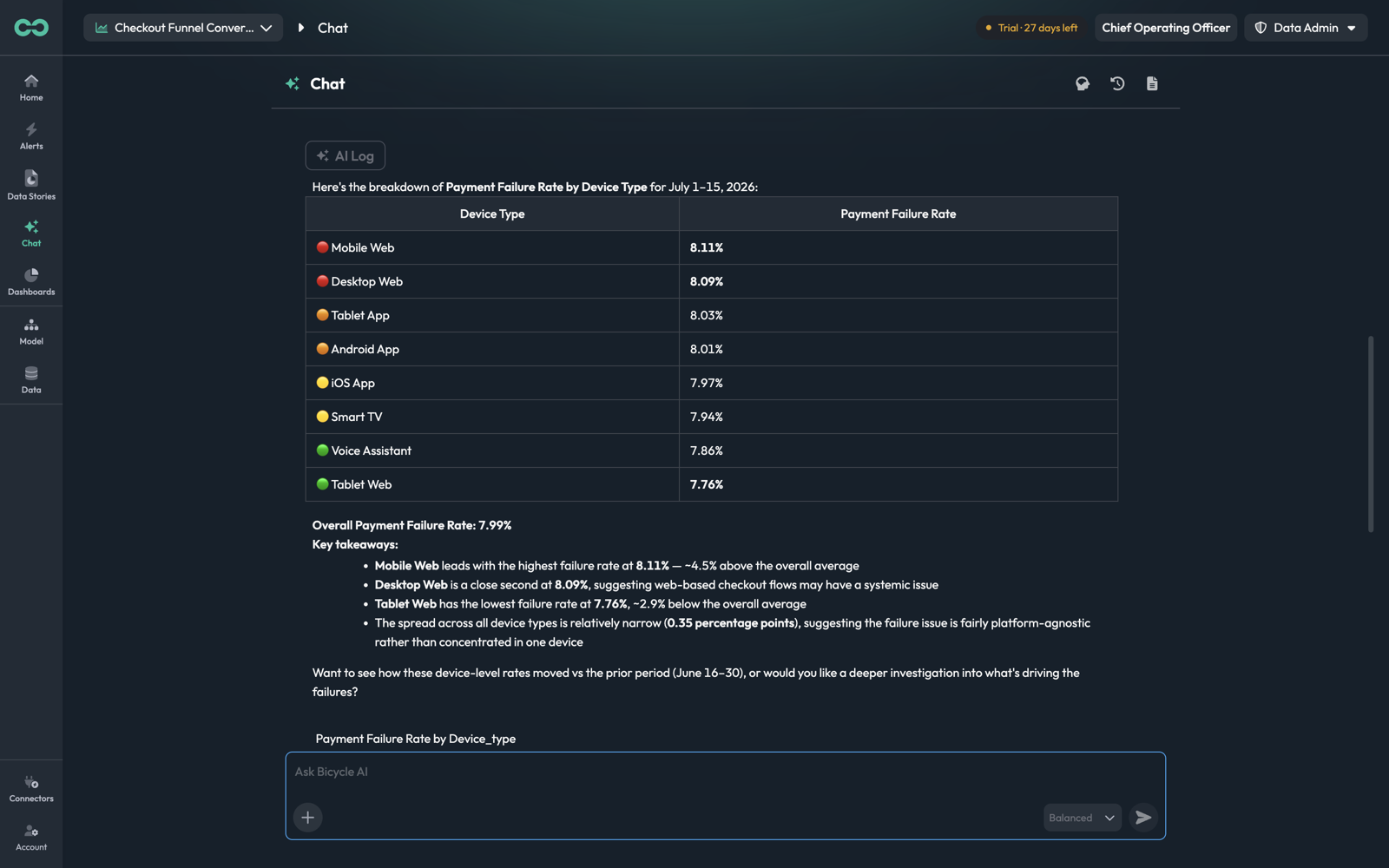
| Element | What it is |
|---|---|
| AI Log chip | Opens the reasoning log for this answer |
| Table | The numbers, ranked, with severity dots on each row |
| Key takeaways | What the agent concluded, with each claim tied to a figure in the table |
| Follow-up question | A suggested next step, phrased as a question you can answer in the thread |
| Chart | The same result as a visualization |
| Thumbs up / down | Feedback on the answer |
| Recommendations | Three generated follow-up analyses; clicking one asks it |
The takeaways are worth reading against the table rather than instead of it. In the example, the spread across every device type is 0.35 percentage points — and the agent says so, calling the issue "fairly platform-agnostic rather than concentrated in one device" even though one device is technically the highest. The ranking alone would have been misleading.
The AI Log
The AI Log chip on any answer opens the trace of how it was produced.
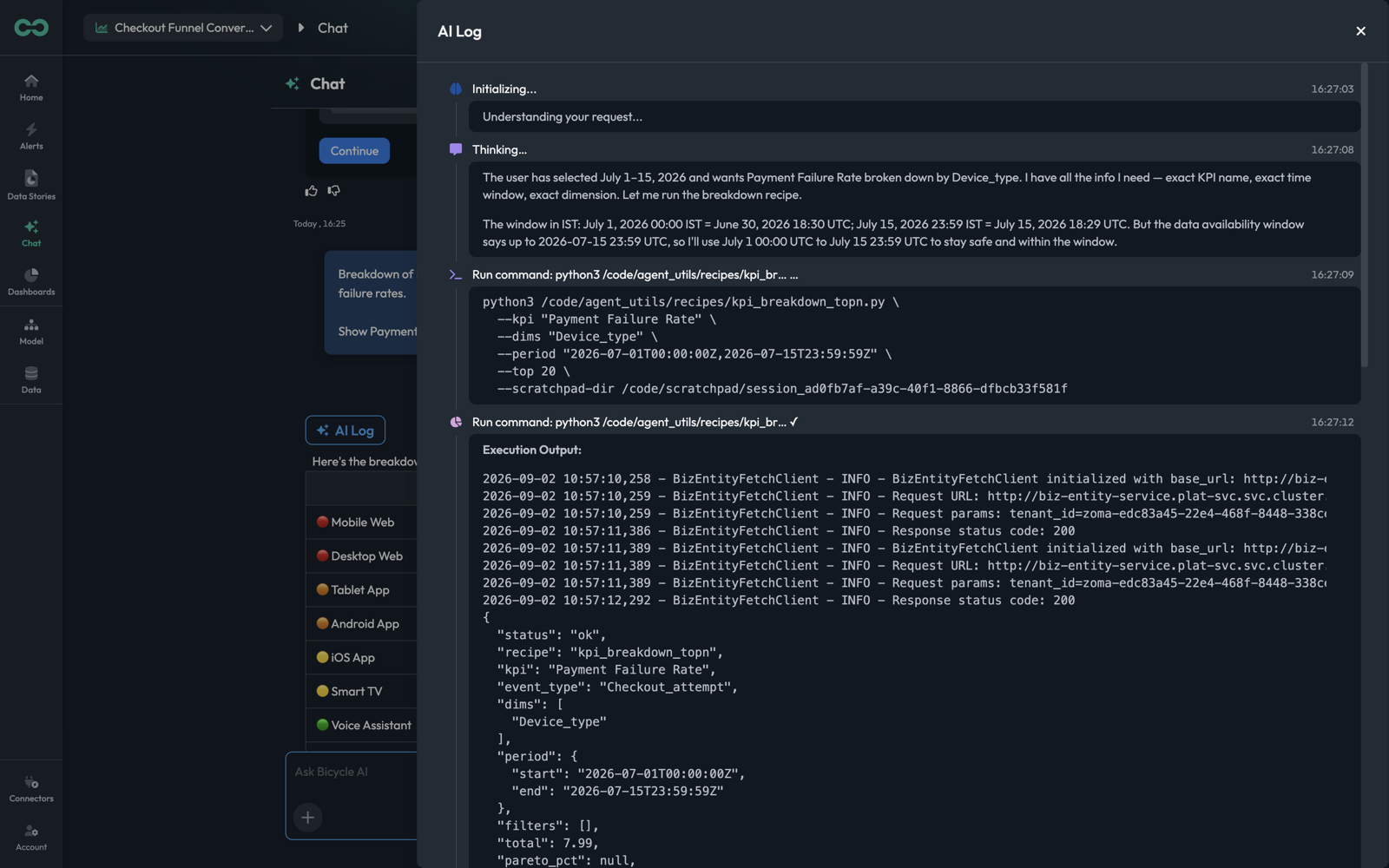
Entries are timestamped and typed:
| Entry | What it shows |
|---|---|
| Initializing | The request being read |
| Thinking | The agent's reasoning — which KPI it matched, how it resolved the time window, what it decided to run |
| Run command | The exact analysis invoked, with its parameters |
| Execution Output | What came back, including the resolved KPI, event type, dimensions, and period |
This is the answer to "where did that number come from". The Thinking entries are the most useful part in practice, because they state the assumptions — in the example, the agent works through the timezone conversion and then deliberately clamps the window to stay inside the available data, and says so.
View full log opens a step's complete output where it has been truncated.
When Bicycle asks before answering
Some questions cannot be answered as asked. Rather than returning a wrong number, the agent stops and asks.
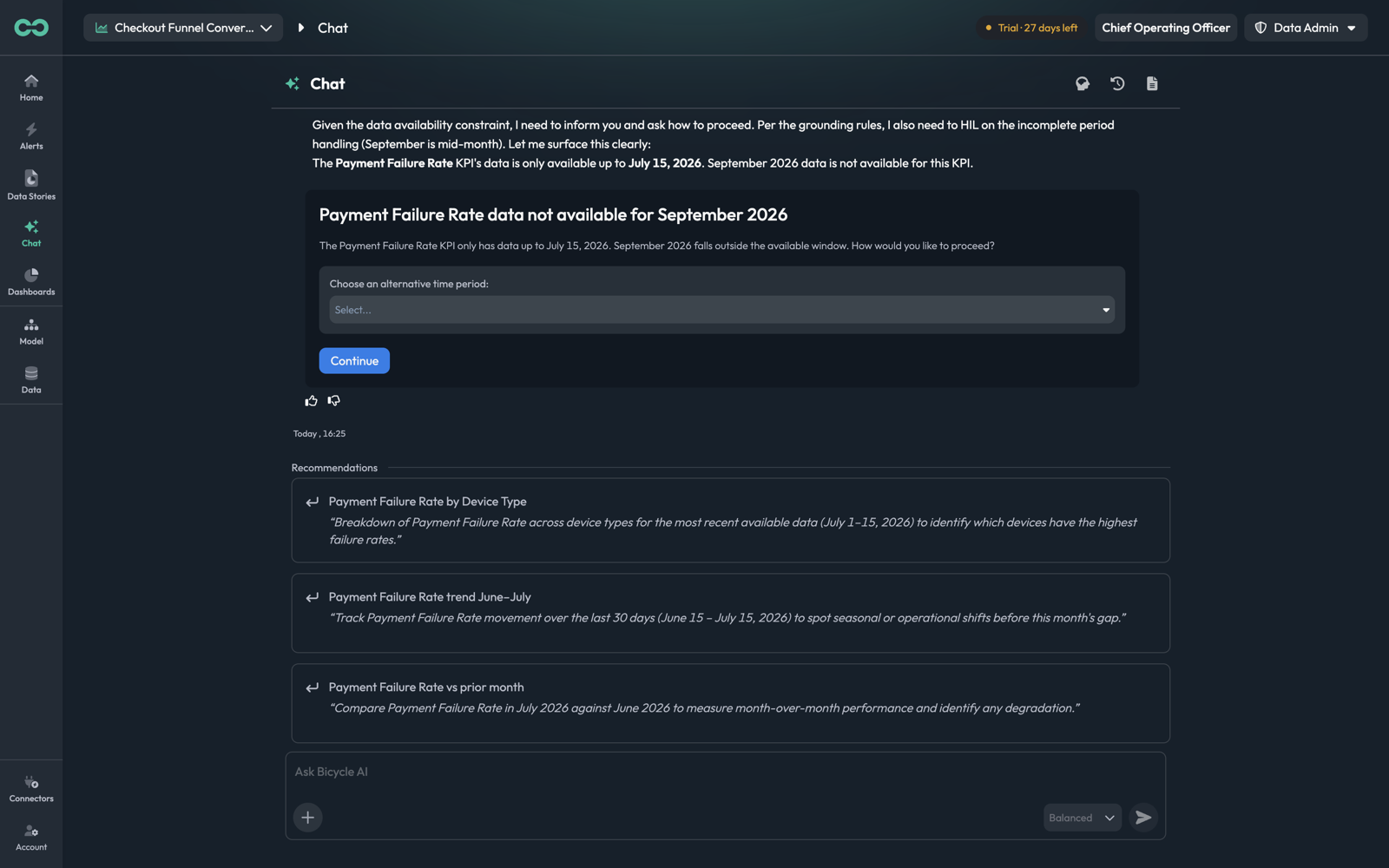
Here "this month" fell outside the KPI's available data. The answer is a card that names the constraint — "The Payment Failure Rate KPI only has data up to July 15, 2026" — offers a picker for an alternative period, and waits on Continue. The Recommendations below it are pre-adjusted versions of your question, scoped to a window that does have data.
The same pattern appears for an ambiguous period, an incomplete one, or a dimension that resolves more than one way. Treat the card as a signal about your model as much as your question: a KPI that repeatedly falls short of "this month" is usually a hydration or ingestion gap worth fixing at the source.
Things to know
- Chat is scoped to a use case. It can only see the KPIs, dimensions, and drivers of the use case in the top-left picker. Switching use cases changes what it can answer.
- Answers are grounded, not invented. A question about a metric you have not modelled gets told so, often with the nearest proxy named. If the agent substitutes something, it says which substitution it made — that sentence is worth reading before you quote the number.
- Charts here are not dashboard widgets. A chart in an answer belongs to the conversation. To keep one, build the equivalent widget on a dashboard.
- The file panel is for inspection. The third header icon opens the session's working files — the prefetched schema, KPI availability, and memory the agent had in context. It is a debugging surface, not part of the normal flow.
- Follow up rather than restart. Recommendations and the composer both stay open under an answer, and a follow-up keeps the resolved KPI and window — re-asking from scratch makes the agent redo that work.
Next: Memory and history — making the agent remember, and finding a past conversation.