Connecting Atlassian (Rovo MCP) to Bicycle
Connect to Atlassian with Rovo MCP so agents can discover sites and use Jira, Confluence, and related tools for CAUSE (investigation) and ACTION (create/update) workflows.
Bicycle supports three auth methods:
| Method | When to use |
|---|---|
| OAuth (recommended) | Interactive setup. Uses OAuth 2.1 (Rovo default). Does not require Allow API token authentication. |
| Personal API token | Headless or shared token setups. Requires org admin to enable Allow API token authentication on the Rovo MCP server (off by default). |
| Service account API key | Long-running / bot-style access. Same Allow API token authentication prerequisite as personal tokens. |
Requirements
To follow the steps in this guide, you'll need:
- Permission to create connectors in Bicycle
- An Atlassian Cloud site with Rovo MCP available
- For OAuth: permission to authorize the Bicycle Atlassian MCP OAuth app for your site
- For API token / service account: an org admin who can enable API token authentication on the Rovo MCP server, plus a scoped token or service account key
Org admin: enable API token auth for Rovo MCP (API token only)
Users connect to the Rovo MCP server with OAuth 2.1 by default. Additional methods (including API tokens) must be turned on explicitly.
If you plan to connect Bicycle with a personal API token or service account API key, an organization admin must enable Allow API token authentication. Without it:
- Identity tools may still succeed (
atlassianUserInfo,getAccessibleAtlassianResources) - Any Jira / Confluence product call fails with:
You don't have permission to connect via API token. Please ask your organization admin for access.
Where to enable
Path: admin.atlassian.com → Rovo → Rovo MCP server → Authentication
Open Atlassian Administration
- Sign in to admin.atlassian.com as an organization admin.
- Select your organization (for example, your company workspace).
Open Rovo MCP server Authentication
- In the left sidebar, under Rovo, select Rovo MCP server.
- Open the Authentication tab (alongside Domains, Permissions, and A2A).
You should see: Users connect to the Rovo MCP server with OAuth 2.1 by default. Enable additional authentication methods below.
Enable Allow API token authentication
Turn Allow API token authentication on.
- Label: Allow API token authentication
- Description in Atlassian: Allow API tokens to access agents or pipelines.
- Leave Allow enterprise managed authentication (BETA) off unless your IdP-based MCP flow is intentionally configured.
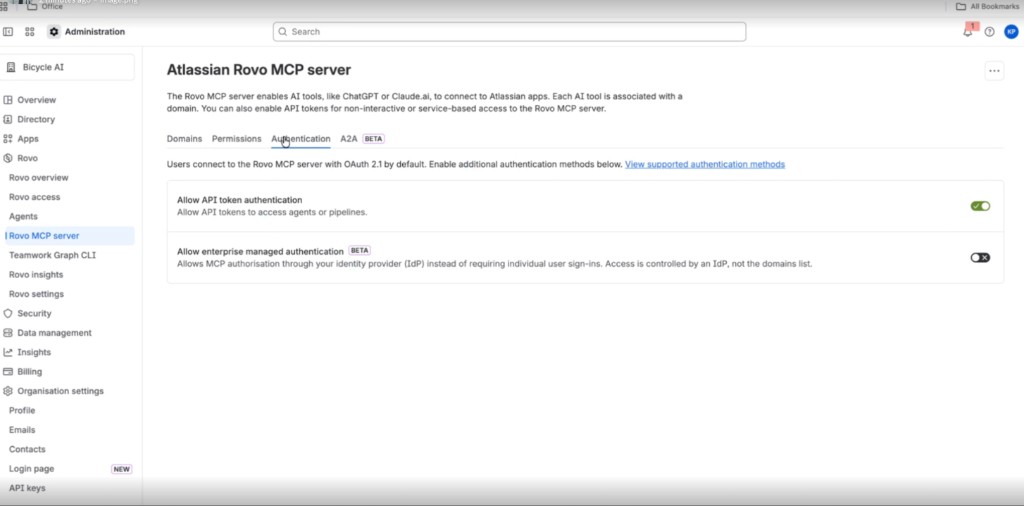
The screenshot shows the toggle Enabled. New organizations typically have this off until an admin turns it on.
Prefer OAuth in Bicycle if you can. It uses OAuth 2.1 (the default) and does not require Allow API token authentication.
Option 1: OAuth (recommended)
OAuth uses Atlassian’s MCP authv2 authorization server (PKCE). Bicycle requests the scopes needed for Jira, Confluence, Compass, and Teamwork Graph automatically — you do not paste tokens.
Scopes requested during OAuth
| Scope(s) | Purpose |
|---|---|
read:me, read:account, email | User identity and accessible Atlassian sites |
offline_access | Token refresh without reconnecting every hour |
read:jira-work, write:jira-work | Read/write Jira issues, projects, JQL, transitions, comments, worklogs |
search:confluence, read:confluence-user | Confluence search and user lookup |
read:page:confluence, write:page:confluence | Read/create/update Confluence pages |
read:comment:confluence, write:comment:confluence | Confluence comments |
read:space:confluence, read:hierarchical-content:confluence | Spaces and page hierarchy |
read:component:compass, write:component:compass | Compass components |
read:scorecard:compass, write:scorecard:compass | Compass scorecards |
read:event:compass, read:metric:compass | Compass events and metrics |
read:all:twg, write:all:twg | Teamwork Graph context and linked objects |
Write scopes appear because this connector supports both CAUSE and ACTION. If the authorizing account lacks write permission in Jira/Confluence, write tools will fail even though scopes were requested. Refresh tokens expire after 90 days of inactivity and rotate on each refresh; Bicycle stores the latest refresh token.
Bitbucket: Bitbucket MCP tools may fail until Atlassian adds Bitbucket scopes to authv2 scopes_supported.
JSM Ops: Ops tools typically work via Jira scopes when the user has JSM access.
Setup in Bicycle (OAuth)
Open Connectors and select Atlassian
In Bicycle, go to Connectors. Find Atlassian (Rovo MCP) and click + Connect.
Choose OAuth
Enter a connection name that identifies the Atlassian site or environment (for example, Atlassian Production). Select OAuth as the connector method, then click Next.
Authorize in Atlassian
- Click Connect via OAuth.
- You are redirected to Atlassian’s authorization page.
- Choose the Atlassian site and products to authorize, then approve access.
- You are redirected back automatically — the connection is ready to use.
Test and add the connection
Click Test connection if offered, then Add connection. Confirm the connection name and method, then click Close.
Option 2: Personal API token
Prerequisite: An org admin must enable Allow API token authentication under admin.atlassian.com → Rovo → Rovo MCP server → Authentication. OAuth 2.1 is the default; this toggle is off until enabled.
Create a dedicated scoped token for Bicycle. Do not use an unscoped classic API token.
Create a scoped token for Jira access
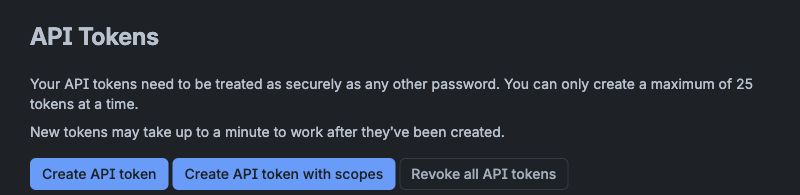
Select Create API token with scopes. Do not select Create API token.
Open API token settings
- Open https://id.atlassian.com/manage-profile/security/api-tokens.
- Select Create API token with scopes.
Name the token and continue
Enter a clear name, choose an expiry date, and continue to Select app.
Select Rovo MCP
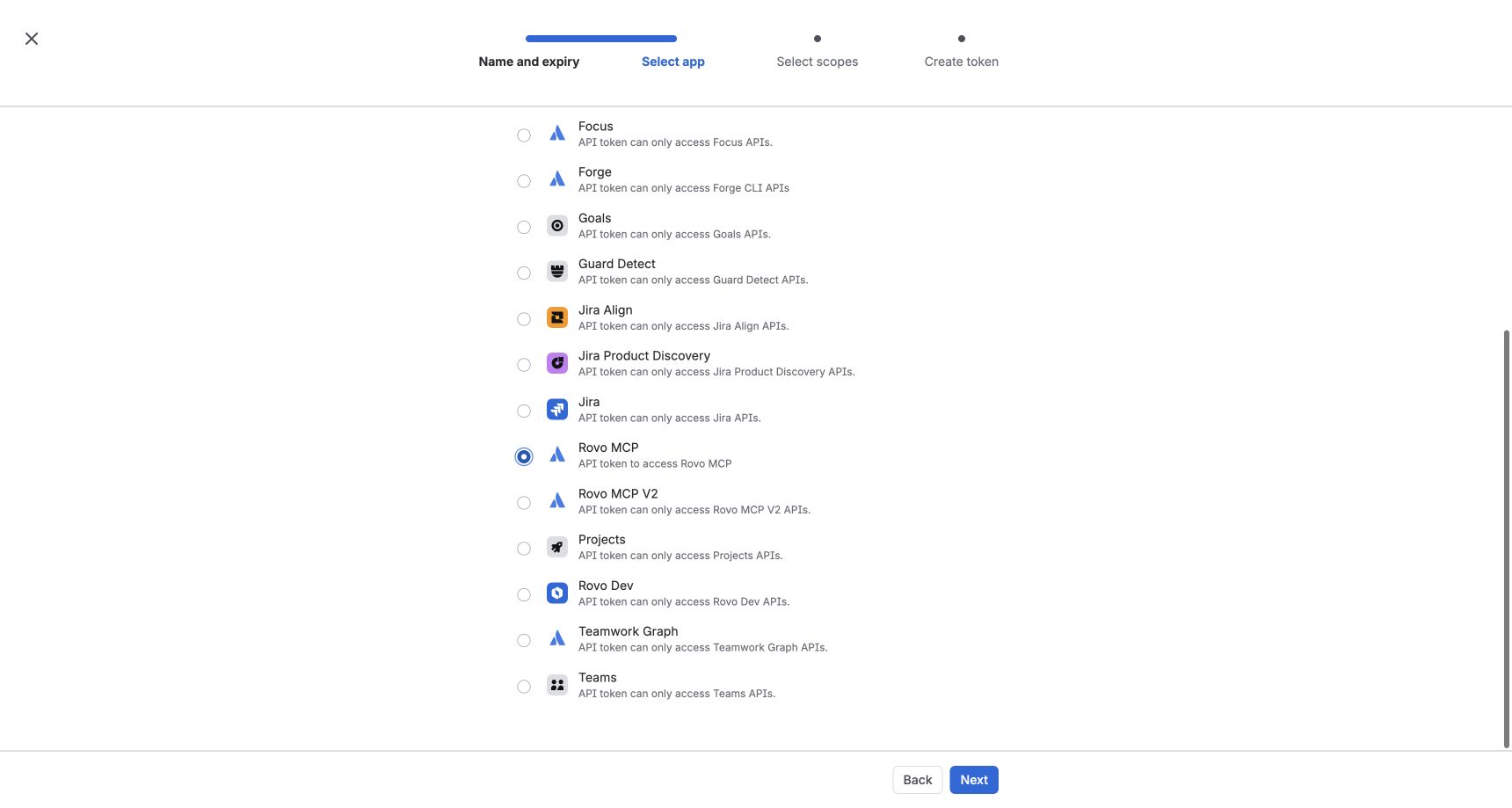
Select Rovo MCP as the app, then continue to Select scopes.
Select Rovo MCP. Do not select Rovo MCP V2.
Select mandatory Jira permissions
Select all five permissions below. They are required for site discovery and full Jira read, search, and write tools. Use the scope search to find each permission.
| Scope | Purpose |
|---|---|
read:me | Identify the authenticated user |
read:account | Read account profile information |
read:jira-work | Read Jira project and issue data |
search:jira-work | Search Jira issues and work |
write:jira-work | Create and update Jira work |
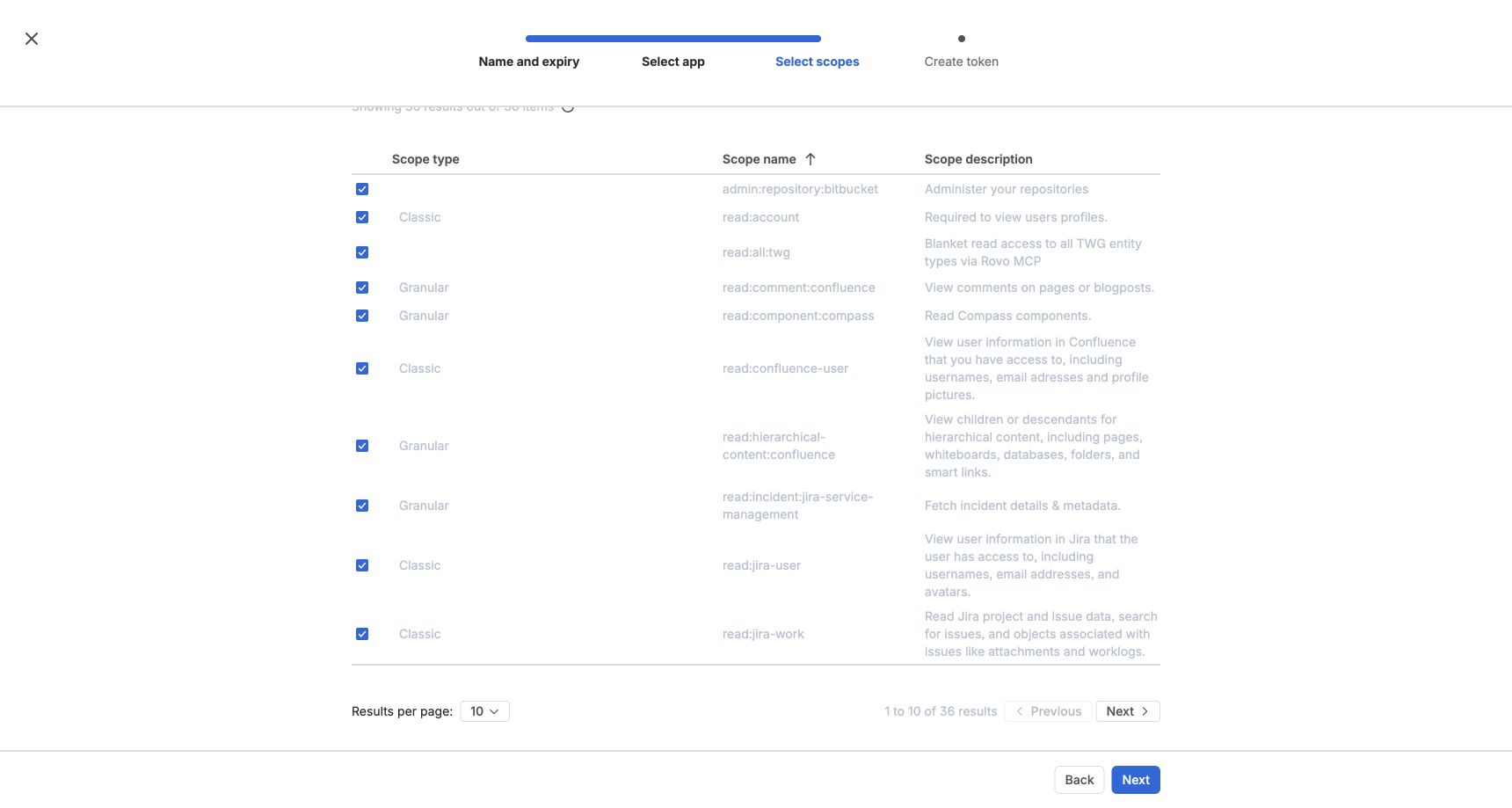
Optionally select Confluence read, search, and write permissions when Confluence access is required.
Review and create the token
Before creating the token, confirm:
- Required app: Rovo MCP
read:meread:accountread:jira-worksearch:jira-workwrite:jira-work
Select Create token. Copy the token immediately — Atlassian displays it only once.
Store the API token in your organization's secrets manager, rotate it according to your security policy, and redact it from screenshots. The Atlassian account behind the token must also have a Jira (and/or Confluence) product license and Browse access to the projects you need.
Setup in Bicycle (API token)
Open Connectors and select Atlassian
In Bicycle, go to Connectors. Find Atlassian (Rovo MCP) and click + Connect.
Choose API token
Enter a connection name (for example, Atlassian Production). Select API token / Personal API Token (Basic Auth) as the connector method, then click Next.
Enter connection details
On the Add details step, fill in the Atlassian connection fields.
Atlassian account emailRequiredEmail address of the Atlassian account that owns the scoped API token.
API tokenRequiredScoped API token created for the Rovo MCP app with the mandatory Jira permissions.
Test the connection
Click Test connection. Bicycle authenticates with the email and token and verifies Rovo MCP tools such as site discovery and Jira access.
If site discovery works but Jira project listing or search fails with "You don't have permission to connect via API token", Allow API token authentication is still off — see Org admin: enable API token auth.
Add the connection
Click Add connection. When the connection is created successfully, confirm the connection name and method, then click Close.
Option 3: Service account API key
Same org-admin prerequisite as Option 2: enable Allow API token authentication on the Rovo MCP server (Authentication tab). Off by default.
- Obtain a Service account API key from your Atlassian org admin.
- In Bicycle, choose Service account API key.
- Paste the key in the dedicated field. Email is not used for this mode.
Troubleshooting
| Error or symptom | Likely cause | Fix |
|---|---|---|
atlassianUserInfo / getAccessibleAtlassianResources work, but Jira tools fail with "You don't have permission to connect via API token" | Allow API token authentication is off on Rovo MCP server (OAuth 2.1 is default) | Org admin: admin.atlassian.com → Rovo → Rovo MCP server → Authentication → enable Allow API token authentication or reconnect with OAuth |
| Unauthorized / invalid credentials | Wrong email or token, or token revoked | Recreate the scoped token and update the connection with the matching account email |
| Missing tools or forbidden | Token without scopes, wrong app, or incomplete permissions | Recreate with Create API token with scopes, select Rovo MCP (not V2), and include all mandatory scopes |
| Site discovery or Jira search fails (after API token auth is on) | Missing scopes, or account lacks Jira license / Browse Projects | Add missing scopes; grant product access and project Browse to the token account |
| Cannot create or update Jira issues | Missing write:jira-work or account lacks write permission | Recreate token with write:jira-work; confirm project permissions |
| Confluence tools unavailable | Confluence scopes not selected | Recreate the token and add Confluence scopes |
| OAuth connect fails or tokens stop refreshing | Refresh token expired (90 days idle) or revoked | Reconnect via OAuth; revoke old grants at id.atlassian.com if needed |
Capabilities
| Capability | Description |
|---|---|
| CAUSE | Use Jira, Confluence, and related MCP tools as investigative evidence in RCA |
| ACTION | Create and update Atlassian work (issues, comments, transitions, and related tools as supported) |
What's next?
Now that Atlassian is connected, you can:
- Use Rovo MCP tools for site discovery, Jira project listing, and JQL search
- Create and update Jira work from Bicycle agent flows (subject to write permission)
- Optionally use Confluence and Teamwork Graph tools when those scopes were granted