Run and subscribe
A definition does nothing until it runs. There are two ways to make that happen: run it yourself, or subscribe it to a schedule.
Run one now
Run a new data story at the top of the page — or Run New on any story card — opens the run dialog.
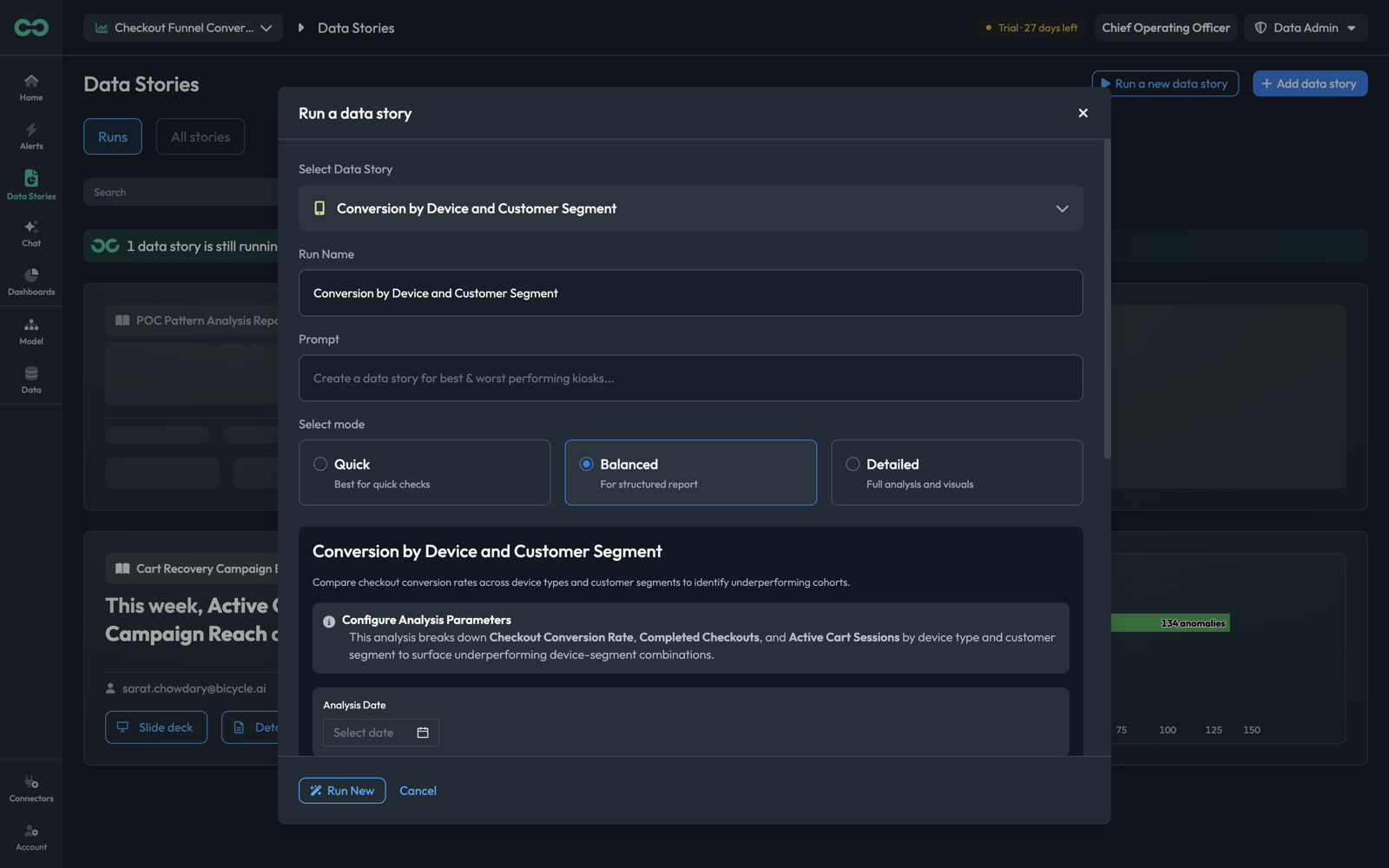
Select Data StoryWhich definition to run. Pre-filled when you came from a story card.
Run NameWhat this particular run is called on the Runs tab. Defaults to the story name — worth changing when you are running the same story over different periods, since otherwise the runs are hard to tell apart.
PromptAn optional instruction for this run only, on top of the definition's system prompt. Use it to narrow or steer one execution without editing the story.
Select modeHow much analysis to perform — see Modes below.
Below those, the story's own parameters appear — the input variables from its definition, with a Configure Analysis Parameters note explaining what the analysis will do with them. Run New starts it.
Modes
| Mode | Description in the app | Reach for it when |
|---|---|---|
| Quick | Best for quick checks | Confirming a definition works, or a fast look at one period |
| Balanced | For structured report | The default — a full written report |
| Detailed | Full analysis and visuals | The run someone will present, or an investigation you want every breakdown from |
The period is the most common reason a run comes back empty or fails. Set Analysis Date to a date your data actually covers, or state the window in the Prompt — "Analyse the period 1 July 2026 to 15 July 2026." A story pointed at a period with no data has nothing to analyse.
While it runs
A run takes minutes, not seconds, and reports its stage as it goes — Fetching & Evaluating Your Data, Building Story Sections, Structuring the Narrative. The Runs tab shows a banner while anything is executing, with Take me there to jump to it, and the card shows "Data story run in progress...".
You can navigate away. The run continues, and the finished output appears on the Runs tab.
When a run fails
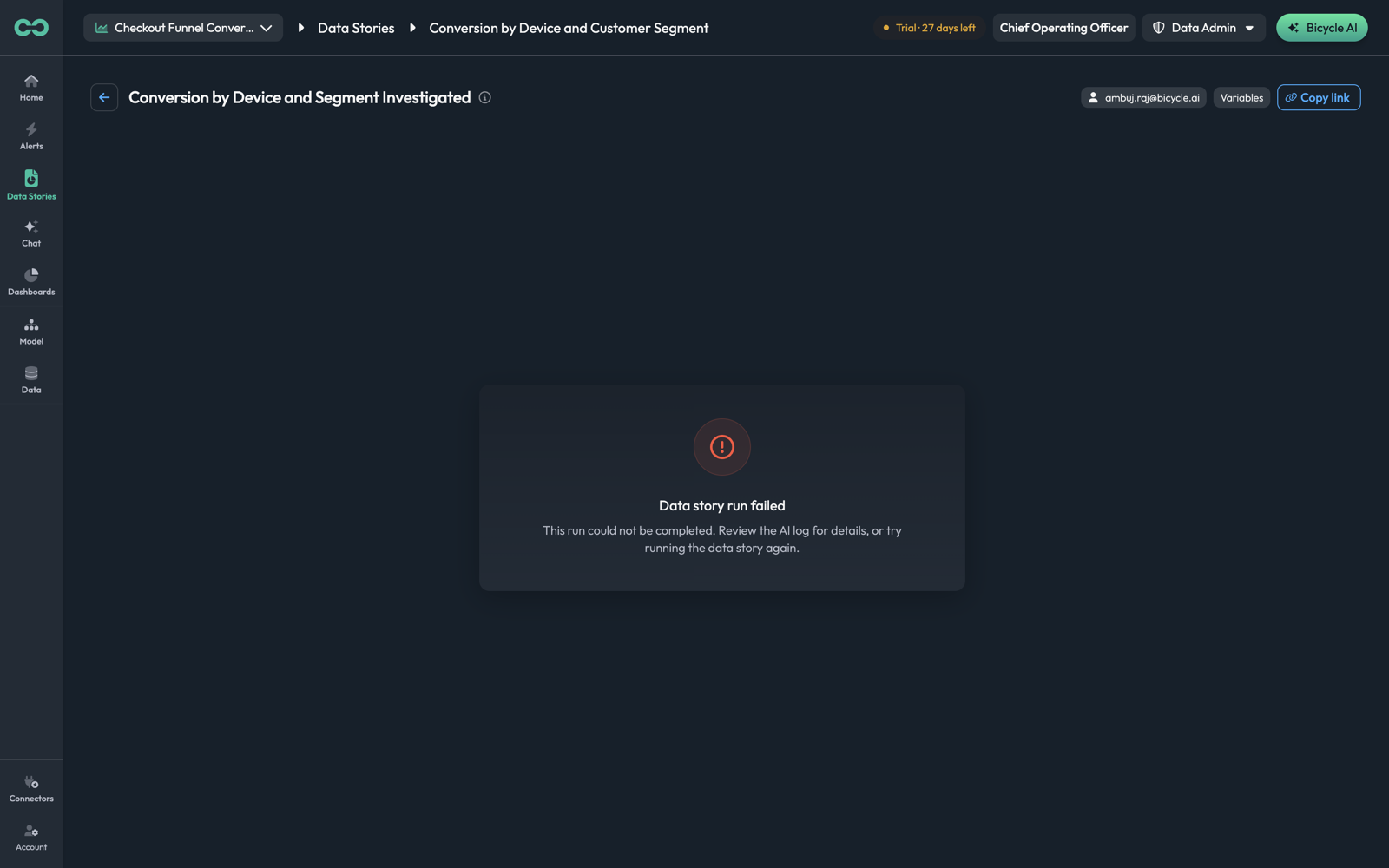
A failed run says so plainly and points at the log: "This run could not be completed. Review the AI log for details, or try running the data story again."
The usual causes, in the order worth checking:
The period has no data
The most common one. Check the analysis date against the window your KPIs actually cover — a story asked about "today" against data that ends last month has nothing to work with.
A dimension name is wrong
The system prompt names fields that must match your schema exactly. This failure often shows up in the headline rather than as an error — "analyses failed on invalid dimensions".
A KPI is not hydrated
The analysis needs the KPI's cube served. See Caching and hydration.
A partial failure is not the same as a failed run. A run can complete, report what it found, and state what it could not do — and that headline is worth reading as feedback on the definition.
Reading a run
A completed run opens with its generated headline and three tabs — Slides, Report, and Causes. Each tab offers Fullscreen and a download, and the page header carries three more controls:
| Control | What it does |
|---|---|
| Variables | The parameters this run was given |
| Copy link | A direct link to this run |
| Bicycle AI | Opens chat against this run, to ask follow-up questions about what it found |
For what each tab contains, see The three views of a run.
Read them in the order the run was produced, not the order of the tabs: Causes first for what was actually established and what was ruled out, then Report for the detail, then Slides when you need to pass it on. Going straight to the deck gives you the conclusion without the confidence attached to it.
Two runs of the same story that disagree have usually been given different parameters — a different analysis date most often. Variables is where that shows, rather than being inferred from the numbers.
Subscriptions
A subscription runs a story on a schedule and emails the result. Set them up from a story's kebab → Subscribe, or step 5 of the definition wizard.
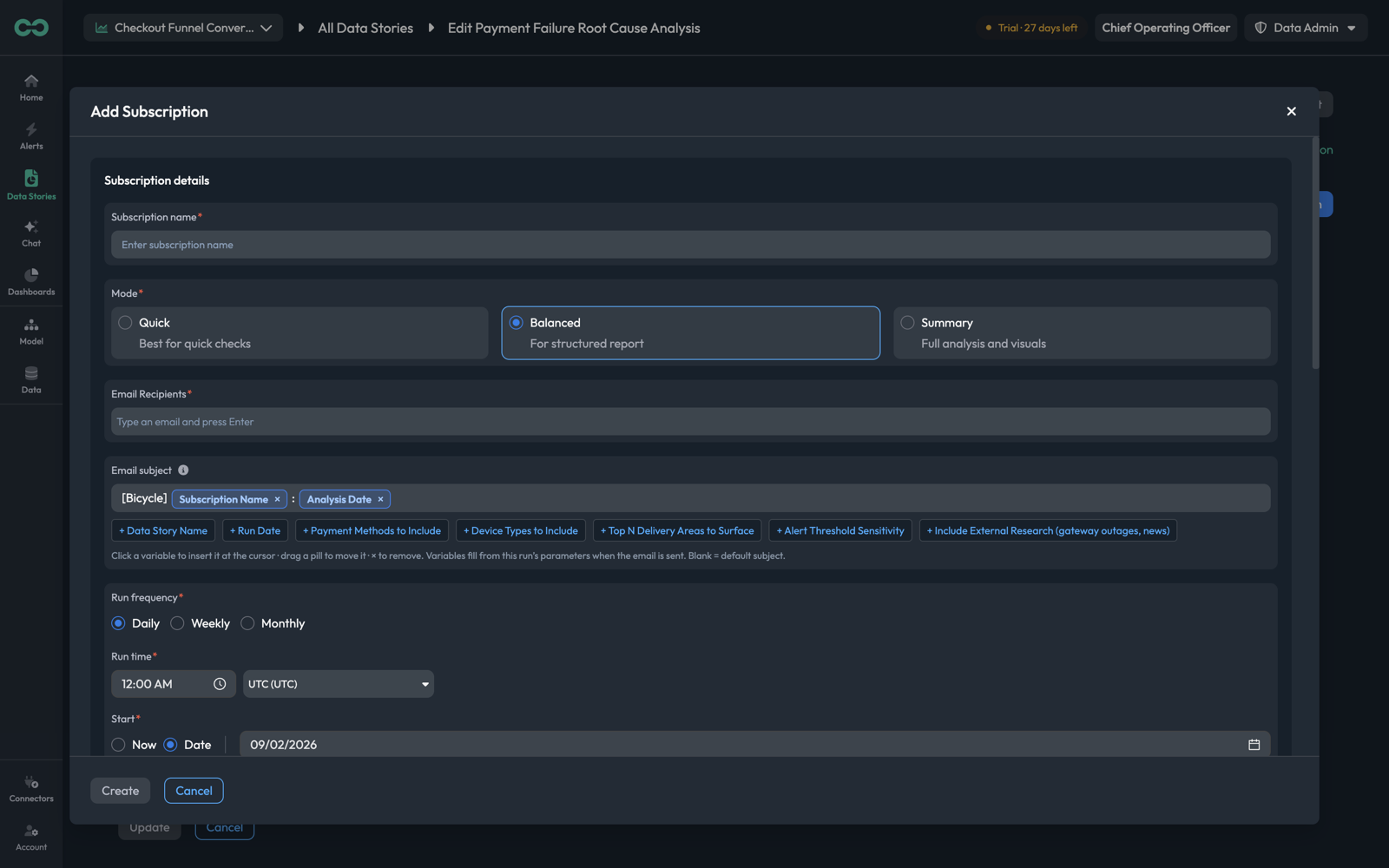
Subscription nameRequiredWhat this schedule is called. A story can have several, so name them by audience or cadence — Weekly exec summary, Daily ops check.
ModeRequiredHow much analysis each scheduled run performs — Quick (best for quick checks), Balanced (for structured report), or Summary (full analysis and visuals).
Email RecipientsRequiredWho receives it. Type an address and press Enter to add each one.
Email subjectThe subject line, built from text and variable pills. Defaults to [Bicycle] Subscription Name : Analysis Date.
Run frequencyRequiredDaily, Weekly, or Monthly.
Run timeRequiredThe time of day, with an explicit timezone.
StartRequiredNow, or a specific date.
Create saves the schedule.
The email subject
The subject field is a small template builder. Click a variable to insert it at the cursor, drag a pill to reorder, and × to remove one. The available variables are the story's own parameters plus Data Story Name and Run Date, and they fill from that run's values when the email is sent.
This matters more than it sounds for a recurring subscription. A subject of [Bicycle] Weekly payment review produces an inbox where every week's email is indistinguishable. Adding Run Date or the parameter that varies makes each one findable later.
An empty subject uses the default. You only need to touch this field to improve on it.
Choosing a cadence
Match the frequency to how fast the thing you are watching actually moves, and to who is reading:
| Cadence | Fits |
|---|---|
| Daily | Operational checks someone acts on the same day — with Quick mode, so it is readable in a minute |
| Weekly | The standing review: what changed, what caused it, what to do — Balanced |
| Monthly | Trend and strategy reporting, where Summary mode's full analysis and visuals earn their length |
Recipients get an email each time the schedule fires, whether or not the run found anything notable. A daily subscription to a story that is usually quiet trains people to ignore it — which is exactly when the one that matters arrives. Prefer a lower cadence, and let patterns and actions handle the "tell me when something breaks" case.
Things to know
- Definitions and runs are separate. Editing a story never changes a run that already happened; a run is a record of what was found with the definition and parameters in force at the time.
- Check Variables before comparing two runs. Different parameters, not different data, explain most surprising differences.
- A story can carry several subscriptions. A daily Quick check for the ops team and a weekly Balanced report for the leads is one definition and two schedules, not two stories.
- Run once by hand before you subscribe. It costs one run to find out that the period is wrong or a dimension name does not resolve, and saves a schedule that emails a failure every morning.
- Ask follow-ups against the run. Bicycle AI on the run header carries that run's findings into chat, which is faster than re-deriving them in a fresh conversation.